Virtual Machines Architecture
This document describes how virtual machine workspaces work in
kube-workspaces. Unlike container workspaces (a StatefulSet + Service that
the proxy fronts) or scratch workspaces (a plain Deployment), a
vm workspace is backed by a KubeVirt VirtualMachine running a full guest
operating system in your cluster. The controller generates the VirtualMachine,
and the API exposes the guest through three WebSocket bridges — a serial
console, a noVNC graphical display, and a web SSH session — while the
browser traffic still lands on the same frontend and API you already know.
A VM workspace is nothing more than a Workspace CR with spec.type: vm. The
rest of the platform shares its name, namespace, RBAC and start/stop model.
VM disks and guest access have their own mappings, described below.
Windows 11 guest support is being validated separately. Operators can use the Windows proof tooling and prerequisites for isolated direct KubeVirt VMs; an enabled Windows workspace catalog/profile is not yet shipped.
Overview
When a user creates a VM workspace, the controller translates the
container-shaped spec.template into a KubeVirt VirtualMachine (the main
container image becomes the guest’s root disk) and KubeVirt runs it as a
virt-launcher pod with QEMU. Users reach the guest through the API’s console
bridges or, for an in-guest web app on a declared port, through the HTTP proxy
and workspace Service. The serial/VNC bridges dial KubeVirt’s aggregated
subresources on the API server; the SSH bridge dials the launcher endpoint.
workspace  in namespace
  ├── VirtualMachine (kubevirt.io) named    ← generated by the controller
  │     └── VirtualMachineInstance
  │           └── virt-launcher pod (QEMU, /dev/kvm)
  └── Service :80                            ← still created; targets the launcher pod
The first declared guest port maps to Service port 80, and KubeVirt’s masquerade interface forwards it into the guest. This Service path was verified under KVM with an in-guest Selkies HTTP server. The guest must run an app on that target port: a Service targeting SSH port 22 is not an HTTP endpoint. The VM Connect button opens the noVNC display; console access is described below.
Component Architecture
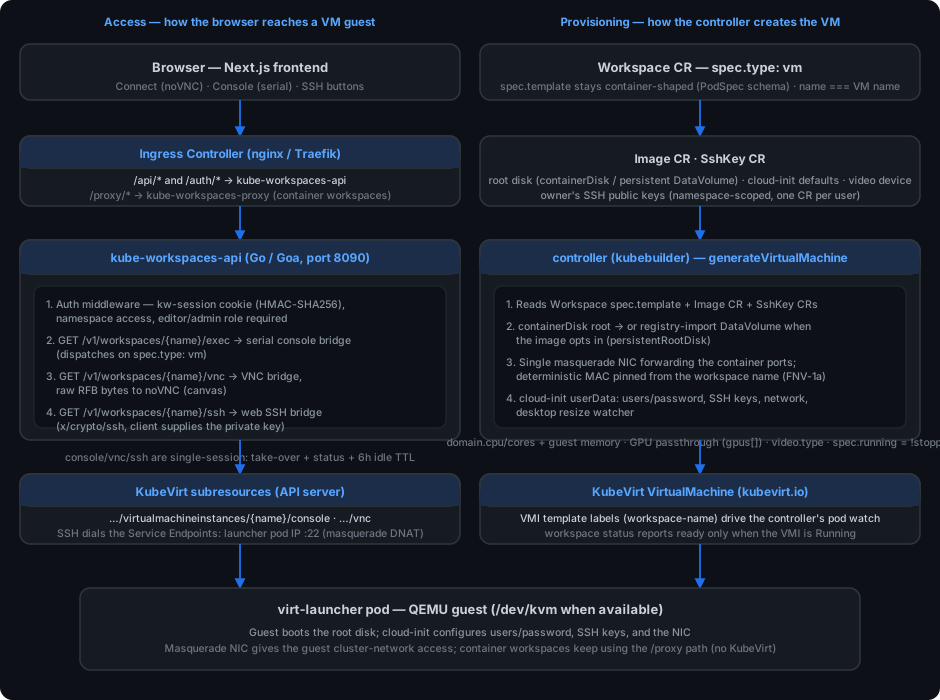
The diagram is split into two planes that meet at the virt-launcher pod:
- Access (left) — the browser path through the frontend and the API’s WebSocket bridges into the guest.
-
Provisioning (right) — the controller turning
Workspace/Image/SshKeyCRs into a KubeVirtVirtualMachine.
Workspace Types
Every workspace declares how it should be run via spec.type (default
container):
| Type | Backing workload | Access |
|---|---|---|
container |
StatefulSet + Service
|
HTTP via the proxy |
vm |
KubeVirt VirtualMachine + virt-launcher pod |
Serial console, noVNC display, web SSH (API bridges) |
scratch |
Deployment (generated pod names) |
HTTP via the proxy |
spec.template.spec stays container-shaped for all types — the VM path
reuses the existing PodSpec schema (image, resources, ports, tolerations,
nodeSelector), so validation and the API payloads are unchanged. The API rejects
shared_memory for vm workspaces. volume_mounts reference reusable CDI
data disks and guest mount paths for VMs (see below); gpu_request is allowed
and flows into the VM (see GPU passthrough).
Provisioning — controller (generateVirtualMachine)
Source: controller/internal/controller/workspace_controller.go
The controller reconciles the Workspace CR and, for spec.type: vm, builds an
unstructured KubeVirt VirtualMachine (name and namespace equal the workspace’s;
no new Go module dependency — the KubeVirt objects are handled with the dynamic
client). The important mappings:
Root disk
The main container image becomes the guest’s root disk:
-
containerDisk (default) — the image is booted directly by QEMU as an
ephemeral overlay; changes are lost on restart. Works for any OCI image, so
the existing image pipeline (image string match,
containers[0].image) is reused unchanged. -
DataVolume root — when the Image CR sets
spec.persistentRootDisk, the controller emits a CDI registry-importDataVolume(PVC-backed) as the root, so the guest survives stops, reboots, and node moves. Size isspec.persistentRootDiskSize(default10Gi). Depends on CDI (kubevirt.cdi.enabledin the chart).
Reusable guest data disks
Create a volume with API payload type: vm-disk (or choose VM Data Disk in
Volumes → New). CDI creates a blank, filesystem-mode DataVolume/PVC with
ReadWriteOnce access. It appears in Volumes while pending and once bound; CDI
must be installed. Existing container PVCs cannot be converted to guest disks.
Attach it when creating a VM through the workspace’s volume_mounts, for example:
"volume_mounts": [{"name": "project-data", "mount_path": "/data"}]
The workspace’s Image must support cloud-init with #cloud-config user-data.
The controller adds a virtio disk with a stable serial and a per-boot command
using /dev/disk/by-id/virtio-…, rather than unstable /dev/vdb ordering. It
formats a signature-free blank disk as ext4 on first use, then mounts existing
ext4 data unchanged on subsequent boots. Partitioned/other filesystem disks are
not reformatted. A newly formatted mount is assigned to the Image’s default
user when that account already exists; existing data ownership is preserved.
Mount paths must be unique, clean absolute data paths; system paths such as
/, /etc, /dev and /usr are rejected.
Data disks are independent of the workspace: stop/start, Reboot, Reset and workspace deletion retain them. Delete them explicitly through Volumes when no longer needed. Reset still reprovisions only the VM-owned root disk. One writable workspace can claim a data disk at a time, including while stopped. To reattach it to another workspace, delete the old workspace and wait for its VMI to disappear. The controller serializes claims with resource-version updates; the API refuses deletion while a workspace/VMI uses the disk. Disk hotplug, resize and changing attachment lists through PUT are not supported in this version; recreate the workspace to change its disk attachments.
CD-ROM (ISO) mounts
For VM workspaces, you can also attach CD-ROM devices (like virtual optical drives) by setting the volume mount type to cdrom. This is useful for installing software from ISO images, loading drivers (including Windows/MS-DOS), or booting from installation media.
CD-ROM mounts require a reusable CDI DataVolume (created as a vm-disk volume type via the API/Volumes UI) that contains ISO image content. The volume is attached as a read-only CD-ROM device.
Example payload for a VM workspace:
"volume_mounts": [
  {"name": "install-iso", "mount_path": "/media/cdrom", "type": "cdrom", "bus": "sata", "readonly": true}
]
Notes:
-
type: set to"cdrom"to attach as an optical disc (defaults to"disk"for block devices) -
bus: CD-ROM bus type -"sata","ide","virtio","scsi", or"usb"(defaults to"sata"when type is cdrom) -
readonly: should betruefor CD-ROMs (defaults totrue) - CD-ROM devices are read-only; the controller sets
readonly: truefor cdrom type mounts - The
mount_pathis still specified but is less relevant for CD-ROMs in many OSes - guests typically access CD-ROMs as optical drives (e.g.,/dev/cdrom,D:on Windows)
CD-ROM-attached volumes follow the same lifecycle rules as data disks: they are independent of the workspace and persist across stops/restarts. One writable workspace can claim a volume at a time.
Networking
A single masquerade interface is attached to the pod network, forwarding
every declared container port (the main container’s ports, or the
defaultPort). KubeVirt rejects multiple interfaces bound to the same pod
network, so all ports share one interface. The interface carries a
deterministic MAC address (macAddressForWorkspace, FNV-1a over the
workspace name, locally-administered unicast 02: prefix) so the guest’s NIC
address survives VMI recreation — otherwise KubeVirt rolls a fresh random MAC on
every start and strands DHCP bindings and MAC-matched network configs.
The debian-xfce catalog defaults also replace the base cloud image’s netplan
configuration with a MAC-independent en* match using DHCP and
systemd-networkd. A per-boot command applies it before package installation,
disables cloud-init network regeneration, and writes an editable static
/etc/resolv.conf with public resolvers 1.1.1.1 and 9.9.9.9. Operators
requiring cluster-internal DNS or restricting public DNS egress should customize
these addresses in the Image’s defaultUserData.
Catalog-default changes require catalog release/vendoring and do not retrofit
an already-provisioned persistent guest automatically.
Resources
The main container’s requests/limits are copied verbatim into
domain.resources, so CPU/memory and any GPU limits land in the guest domain.
Two refinements:
-
domain.cpu.coresis pinned from the container’s CPU limit, so a 4-CPU limit yields 4 vCPUs (KubeVirt otherwise defaults to 1). - Guest memory is pinned via the Image CR:
spec.memoryLimitsets the guest RAM, andspec.memoryRequestoptionally decouples thevirt-launcherpod allocation from the guest RAM (headroom for QEMU overhead). Requests and limits are kept equal so the workload stays QoS Guaranteed.
GPU passthrough
Any container resource limit whose name is a known GPU resource
(nvidia.com/gpu, amd.com/gpu, intel.com/gpu, or any */gpu key) is
emitted as both the scheduling resource in domain.resources.limits and a
KubeVirt domain.devices.gpus[] entry (deviceName = resource, name =
gpuN). The workspace’s nodeSelector/tolerations are carried into the VMI
template so the virt-launcher pod can land on dedicated/tainted GPU nodes.
For the device to be attachable, the operator must also: enable IOMMU on the
host, run a device plugin advertising the resource, and allowlist the device in
the KubeVirt CR via the chart’s kubevirt.gpuPassthrough.permittedHostDevices.
See Installation for the operator steps.
Display device
The Image CR spec.videoDevice (enum virtio;vga;bochs;cirrus;ramfb) selects
the KubeVirt domain.devices.video.type. virtio attaches the virtio-gpu
paravirtual display — the recommended choice for desktop images: faster noVNC
rendering and guest-set resolutions (see Fluid display resize).
Unset lets KubeVirt auto-attach its default (VGA for BIOS, bochs for EFI). A
USB absolute tablet input is always attached (vm mouse pointer tracking).
Cloud-init user-data
When the Image CR opts in (see VM image fields), the
controller attaches a cloudInitNoCloud datasource with the user-data
inlined as plaintext in cloudInitNoCloud.userData:
-
defaultUserData(explicit image-config) wins when set; - otherwise
defaultCloudInit+defaultUser+defaultPasswordgenerate a#cloud-configthat sets the account password (chpasswd list:, multi-line form — a YAML list is silently ignored by cloud-init).
Because a containerDisk root is ephemeral, cloud-init runs again on every start.
For DataVolume roots, first-boot modules such as ssh_authorized_keys and
runcmd are PER_INSTANCE: a restart does not re-run them.
SSH key seeding
The controller watches SshKey create/update/delete events and reconciles all
VM workspaces in the same personal namespace, including stopped VMs.
For Images declaring defaultUser and opting in with the metadata annotation
kubeworkspaces.io/ssh-key-propagation: qemuGuestAgent, it maintains a
Workspace-owned {name}-sshkeys
Secret and attaches it through KubeVirt’s accessCredentials.sshPublicKey
with qemuGuestAgent propagation to that user. The Secret is attached even when
the key list is empty, so the first addition and last deletion both propagate
without recreating the VM. Keys are not baked into these guests’ cloud-init
data; this avoids restoring revoked keys on reboot.
The platform owns that guest user’s entire authorized_keys file. Manual
guest entries are replaced; save every desired public key as a SshKey CR.
Deleting a CR revokes the key when KubeVirt synchronizes the Secret. Delivery is
eventual (Secret-volume refresh plus KubeVirt’s agent polling), not synchronous
with the API response, and does not terminate already-open SSH sessions.
The guest must install and run qemu-guest-agent and permit its SSH-key commands.
The Debian VM and XFCE catalog defaults install and start the agent and opt in
with this annotation. Cloud-init capability alone does not opt an Image in;
existing custom images keep their first-boot behavior. Images without an agent cannot synchronize
keys through this mechanism. Inspect the VMI’s AgentConnected and
AccessCredentialsSynchronized conditions when diagnosing failed delivery:
kubectl -n "$NAMESPACE" get vmi "$WORKSPACE" -o jsonpath='{.status.conditions}'
Existing VMs need one stop/start or platform Reboot after the controller adds the credential reference: KubeVirt cannot attach a new credential Secret to a running VMI. No restart is forced. Once attached, additions, rotations and deletions apply live. Persistent disks are preserved by Reboot; Reset reprovisions the guest and is not needed for migration. Save existing manual keys in the Profile’s SSH-key list before migrating.
For other Images, the controller retains ssh_authorized_keys first-boot
cloud-init seeding. Neither that module nor runcmd guarantees re-seeding on
reboot, and deletion does not revoke keys already written to those guests.
Lifecycle & status
-
spec.runningis!stopped— stop/start is annotation-driven (kubeworkspaces.io/stopped), exactly like container workspaces. - The VMI template carries the
workspace-namelabel, so the existing pod watch maps thevirt-launcherpod back to the workspace and populates status (readyReplicas, conditions).readyReplicasonly counts when the VMI is actually in theRunningphase, so a crashing/restarting guest is not reported as ready. - A 2-minute cache resync recreates missing VMs (a vanished
VirtualMachine— e.g. after a KubeVirt platform teardown — is replaced on the next reconcile).
KubeVirt presence detection
The controller probes the VM GVK on the cluster before generating anything. If
KubeVirt’s CRDs are absent, a type: vm workspace sets a status condition
(KubeVirtNotInstalled) and is skipped — the controller does not crash and
container/scratch workspaces are unaffected.
Access — API WebSocket bridges
Source: api/internal/exec/vmconsole.go, vmvnc.go, ssh.go
All three bridges require the kw-session authentication cookie
(HMAC-SHA256-signed, ApiToken/ApiTokenV1-style bearer also accepted), editor
or admin role, and namespace access — the same auth model as the container
proxy and the REST API. Each is single-session per workspace:
KubeVirt’s serial console and VNC are single-session, last-wins, so a blind
second dial would silently sever the existing user. The API therefore runs a
sessionRegistry (one slot per workspace per mode) that returns 409
Conflict while a session is held and exposes take-over/status endpoints.
Serial console — GET /v1/workspaces/{name}/exec
Dispatch on spec.type: container → container exec into pod {name}-0;
scratch → exec into the label-resolved pod; vm → the serial console bridge.
The bridge upgrades the client to a WebSocket that dials the KubeVirt VMI
console subresource:
/apis/subresources.kubevirt.io/v1/namespaces/{ns}/virtualmachineinstances/{name}/console
- Uses the
plain.kubevirt.iosubprotocol and the API server’s own ServiceAccount bearer token (read fresh from the projected token file —consoleToken()prefers the kubelet-rotatedBearerTokenFileover the startupBearerToken, avoiding the ~1h console 401 class of bug). - Raw serial stream — no shell is spawned. The guest image must run a getty on the console for a login prompt (stock cloud images do; the VM demo images autologin or set a password via cloud-init).
- Terminal
resizecontrol messages are swallowed (serial consoles have no resize channel); a 30s keepalive ping keeps idle consoles alive through intermediaries.
VNC display — GET /v1/workspaces/{name}/vnc
For vm workspaces, the /vnc bridge dials the VMI VNC subresource
(…/virtualmachineinstances/{name}/vnc) and proxies raw RFB bytes — no
decoding server-side. The frontend attaches a noVNC RFB client to the bridge;
the two talk RFB end-to-end (including SetDesktopSize for fluid resize). Like
the console, VNC is a single-session, last-wins subresource, guarded by the same
registry with a strict 409 (no silent take-over for the display). Tier 0 is one
of two display tiers — see Display tiers & audio for how
Tier 0 compares with the Tier 1 premium paths, which client plays each tier,
and what audio each combination provides.
Adaptive Quality Controller (AQC)
The AQC’s Poor / Fair / Good network quality tiers tune Tier 0 RFB only; Tier 1 sessions have no quality tiers (see Network quality tiers). The VNC display includes an Adaptive Quality Controller that dynamically tunes the visual experience based on real-time network conditions:
-
Metrics Engine: The frontend hooks the underlying WebSocket to measure
throughput (bytes/sec) and RTT (latency). RTT is measured by
injecting VNC
FramebufferUpdateRequestmessages and timing the server’s response. -
Adaptive Quality: Based on these metrics, the controller selects one of
three quality tiers (Poor, Fair, Good) and updates
rfb.qualityLevelandrfb.compressionLevelon the fly. A 3-second hysteresis prevents quality “flapping” during jittery network conditions. - Lossless Refresh: To ensure a sharp image for static content, the controller detects when motion stops. After 1 second of idle time, it requests a full-screen refresh at quality level 9 to improve static text and UI clarity. QEMU quality level 9 still permits JPEG; it does not guarantee lossless pixels. True lossless mode requires omitting the JPEG-quality pseudo-encoding from a new encoding list, as described below.
-
Server-side Logging: The API bridge includes a
throughputLogger(enabled viaAQC_DEBUG_THROUGHPUT=1on the API pod) for server-side bandwidth monitoring.
Native desktop client — adaptive RFB quality
The native client’s Tier 0 RFB controller is implemented and enabled by default in shell/CLI graphical sessions (matching the web client), with per-generation configuration, shared adaptive request cadence, manual override flags, and the one-second lossless idle refresh. Tier transitions, hysteresis, pressure/recovery, refresh-feedback, cancellation, pacing, and controller-shutdown tests pass, as do build/vet/full tests/race/ lint and the six-target cross-builds.
The native client uses the same API /vnc WebSocket bridge to QEMU. Its
controller lives in desktop-client/internal/rfb/adaptive.go, with connection
wiring in internal/rfb/conn.go. This is client-side behavior: it requires no
additional guest agent, Helm value, API setting, or proxy route.
When enabled, the controller:
- Samples framebuffer bytes, changed pixel area, decoder occupancy, and request-to-update latency in 400 ms windows. Audio traffic is excluded from the framebuffer byte samples. Latency is a response-time proxy, not ping RTT; incremental requests can wait for guest damage. Decoder occupancy includes time waiting for incoming data, not just CPU processing.
- Starts at Good, drops one tier immediately under throughput, latency, or
decoder pressure, and recovers one tier after 2 seconds of continuous
headroom. It re-sends
SetEncodingswhile preserving audio and other feature advertisements. - After sustained low motion (600 ms, evaluated on the sampling cadence), switches to lossless and requests one non-incremental full-screen repaint. The repaint itself is suppressed from motion feedback so it does not cause repeated idle refreshes.
- Exposes a recommended request interval through
Conn.QualityInterval(): 16 ms while active and 80 ms while idle, and the session loop now consumes this recommendation as its request cadence.
The initial tier table is provisional, awaiting a live video/scrolling probe sweep. These are pressure thresholds, not measured network capacity:
| Tier | Tight JPEG quality | Compression level | Throughput pressure threshold |
|---|---|---|---|
| Poor | 3 | 9 | 500,000 bytes/s |
| Fair | 6 | 6 | 2,000,000 bytes/s |
| Good | 8 | 3 | 8,000,000 bytes/s |
| Lossless | Omitted (Quality: -1) |
3 | 32,000,000 bytes/s |
QEMU resets JPEG quality to disabled when processing a new SetEncodings
without a quality pseudo-encoding. Sending quality 9 instead would still allow
lossy JPEG, so the native lossless tier deliberately omits it.
Automated checks cover tier transitions, hysteresis, idle refresh, configuration validation, encoding and repaint messages, audio-advertisement preservation, and controller shutdown on EOF.
Native VNC and serial access with virtctl
Operators with Kubernetes access can connect directly through KubeVirt using
virtctl.
Use a virtctl version matching the installed KubeVirt release and a kubeconfig
for the target cluster. These commands use Kubernetes credentials, rather than
the kube-workspaces browser session or native-client login.
Set the workspace’s namespace and name (the VM/VMI has the same name):
NAMESPACE=your-personal-namespace
WORKSPACE=your-vm-workspace
kubectl -n "$NAMESPACE" get vmi "$WORKSPACE"
kubectl auth can-i get virtualmachineinstances/vnc --api-group=subresources.kubevirt.io -n "$NAMESPACE"
With remote-viewer installed locally (commonly the virt-viewer package),
launch a graphical viewer:
virtctl -n "$NAMESPACE" vnc "$WORKSPACE"
To use a different VNC viewer, keep a local proxy running:
virtctl -n "$NAMESPACE" vnc --proxy-only "$WORKSPACE"
Connect the viewer to 127.0.0.1 at the port printed by virtctl, for example
remote-viewer vnc://127.0.0.1:5900 if the printed port is 5900. Leave the
proxy process running until you close the viewer, then stop it with Ctrl-C.
No guest VNC server, Service exposure, or public VNC port is needed: traffic
is tunneled through the Kubernetes API to QEMU.
For a serial console (a guest getty is required):
kubectl auth can-i get virtualmachineinstances/console --api-group=subresources.kubevirt.io -n "$NAMESPACE"
virtctl -n "$NAMESPACE" console "$WORKSPACE"
Use Ctrl-] to leave the serial console. Kubernetes RBAC must grant get on
virtualmachineinstances/vnc or virtualmachineinstances/console in API group
subresources.kubevirt.io, scoped to the target namespace; a platform editor
role alone does not supply kubeconfig credentials. A stopped VM must be started
before either console is available.
Direct virtctl access bypasses the platform’s display leases, shared-display
membership, and takeover prompts. Close browser/native display sessions first
and coordinate with other users: another direct VNC or serial connection can
fail or displace the active connection. For shared viewing and consent-based
control transfer, use the platform clients. To diagnose tunnel failures, add
-v 4 to the virtctl command and check the VMI’s status and your RBAC.
Web SSH — GET /v1/workspaces/{name}/ssh
A browser-native SSH into the guest:
- The client upgrades and sends a first JSON message:
{"type":"ssh","user":…,"privateKey":"<PEM>"}. The private key is held in memory only, for the lifetime of the bridge — never persisted server-side. - The bridge dials the Service Endpoints address — the
virt-launcherpod IP:22, where KubeVirt’s masquerade DNAT forwards to the guest sshd — withx/crypto/ssh. The bridge retains this direct-endpoint path; Service→guest HTTP routing has also been verified under KVM. - Guest sshd host keys are self-generated and rotate per image rebuild, so no host-key verification is possible — instead the session rides the authenticated WebSocket over TLS to the API (auth at the API, not at the guest’s sshd).
The guest must be running sshd and have one of the owner’s propagated keys for
defaultUser (see SSH key seeding).
Sessions, take-over and control endpoints
| Endpoint | Purpose |
|---|---|
GET /v1/workspaces/{name}/console/status / …/ssh/status
|
{"inUse": bool} — is the session held? |
POST /v1/workspaces/{name}/console/takeover / …/ssh/takeover
|
Force-end the held session so the caller can connect (returns {"ok":true,"wasInUse":bool}) |
POST /v1/workspaces/{name}/reboot |
Delete the VMI — KubeVirt recreates it from the parent VM; a DataVolume root is preserved |
A session held by a new owner receives a clean close frame
("taken over by another user"), so the browser treats it as intentional
rather than auto-reconnecting in a fight against the new owner. Idle sessions
expire after a 6-hour TTL. Reboot requires the VM type check and editor
role; it is a “cold” restart (VMI delete), not a guest-internal reboot.
VM networking note (SSH target)
vm workspaces still get a Service {name}:80 (the proxy path is untouched in
phase 1), but for VMs the Service’s endpoints are the virt-launcher pod. The
SSH bridge deliberately dials those endpoints directly. Container workspaces
are unaffected.
VM image fields
The Image CR (controller/api/v1alpha1/image_types.go) fields relevant to VM
workspaces, all of which the controller consumes at VM-create time:
| Field | Effect on VM workspaces |
|---|---|
workspaceTypes |
Restricts which spec.types an image can be used with (e.g. [vm]); the frontend hides the image for other types |
defaultUser / defaultPassword
|
Credentials seeded into the guest via cloud-init (chpasswd); surfaced in the API result for the console/SSH login hints |
defaultCloudInit |
Declares the image runs cloud-init — required for user-data seeding |
defaultUserData |
Explicit cloud-init user-data (wins over generated defaults) |
persistentRootDisk / persistentRootDiskSize
|
Root disk becomes a CDI registry-import DataVolume (default 10Gi) |
memoryLimit / memoryRequest
|
Guest RAM / virt-launcher pod allocation (decoupling keeps the workload Guaranteed) |
videoDevice |
KubeVirt domain.devices.video.type (e.g. virtio for virtio-gpu) |
defaultPort / additionalPorts
|
Forwarded on the masquerade interface (same semantics as container Service ports) |
VM images live in the image-catalog
repo (*-vm images, e.g. debian-xfce, debian-vm, alpine-vm) and are
vendored into the deploy manifests.
SSH keys (SshKey CR)
Web SSH need not use the in-browser serial console; it uses the user’s existing
SSH keys. The SshKey CRD (kubeworkspaces.io/v1alpha1) stores one or more
public keys per user in their personal namespace:
-
spec.publicKey— a fullssh-ed25519 AAAA…/ssh-rsa AAAA…line; validated against a known key type, with the fingerprint computed intostatus. - Created/read/deleted via the API (
/v1/sshkeys*) and the frontend Profile page; RBAC scopes reads to the caller’s own namespace.
The controller injects these keys into VM user-data as described in SSH key seeding, so a user’s browser SSH session works with whatever key they already use, without the server ever holding a private key.
Frontend
Sources: frontend/src/lib/use-serial-console.ts,
frontend/src/components/terminal-modal.tsx, frontend/src/components/vnc-display.tsx
- Workspace detail page: a type badge, a prominent Connect button (noVNC display) next to Console (serial) and SSH, and a Reboot button. Connect/Console/SSH open the same shared modal, each selecting a different initial mode (display/serial/ssh); in-modal toggles switch between them, and a Minimize button docks the modal to a bottom status bar while keeping the WebSocket alive.
- The serial console uses an
xterm.jshook with persistent state, automatic reconnect (capped exponential backoff), take-over consent prompts, and clean close detection. - The display console drives noVNC with
scaleViewport+resizeSession(assigned after construction — noVNC silently ignores them in the constructor options). - VM views gain a YAML-tab User Data button rendering
cloudInitNoCloud.userDatalive from the VM.
Fluid display resize
resizeSession lets noVNC observe its container and send VNC SetDesktopSize
to QEMU (good under the virtio-gpu driver). QEMU updates the virtio-gpu EDID to
the new preferred mode, but the guest’s Xorg session does not apply it by
itself — so the desktop images install a persistent systemd poller
(kw-display-resize service) that watches the DRM preferred-mode sysfs file
every 0.5s and applies the settled size with xrandr --auto. Result: resizing
the browser modal resizes the guest display live, both directions.
Deployment
KubeVirt is a prerequisite installed separately (or via the chart):
- Chart values:
kubevirt.enabledinstalls the vendored upstream KubeVirt operator + theKubeVirtCR into thekubevirtnamespace;useEmulationruns guests without/dev/kvm(kind/CI — slow; setfalseon real nodes with KVM);kubevirt.cdi.enabledinstalls CDI for DataVolume roots. - RBAC (shared
kube-workspaces-managerClusterRole, mirrored into kustomize and helm):virtualmachinesCRUD;virtualmachineinstancesget/list/watch/ delete (delete powers/reboot);subresources.kubevirt.iovirtualmachineinstances/console+…/vncget (the API bridges); and CDIdatavolumesfor persistent roots.compare-rbac.pykeeps the kustomize and helm copies in sync.
See Installation for the KubeVirt prerequisite, GPU/IOMMU operator steps, and kind setup.
See also
- Proxy — how container/scratch workspace HTTP traffic is routed (unchanged by VM support)
-
API Reference — the REST API, including the console
/status//takeoverand/rebootendpoints - Image catalog — the VM image definitions and their fields