Overview
Kube Workspaces is a Kubernetes-native platform for managing container-based workspaces, virtual machines, and full Linux desktops from a web browser. Workspaces run in your own cluster, so every developer gets an isolated, reproducible environment — and the platform requires no external database.
Modelled on the Kubeflow Notebooks architecture but as a standalone, lightweight solution.
How it works
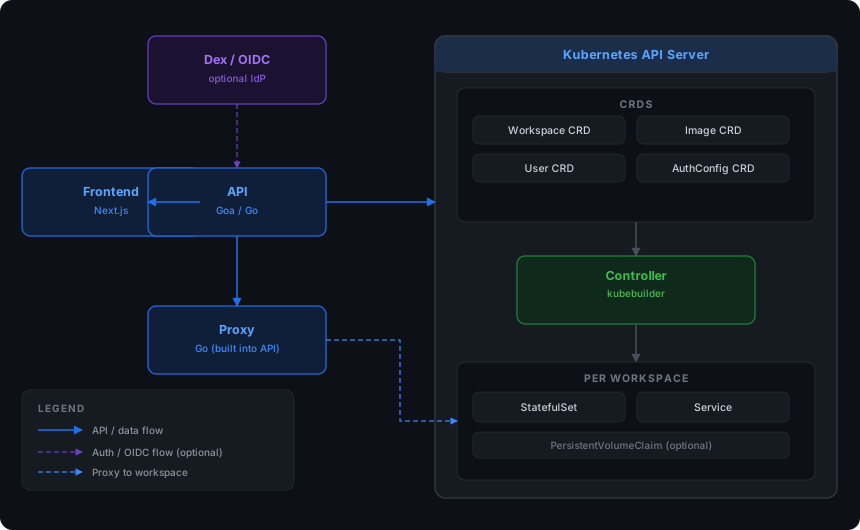
Four loosely-coupled components are deployed to your cluster:
-
Controller — a Kubernetes controller (kubebuilder) that reconciles the
Workspace,Image,User,AuthConfig, andPlatformConfigcustom resources. - API — a REST service (Goa) for workspace CRUD, volumes, images, authentication, and administration.
- Proxy — a reverse proxy that routes browser traffic to workspace web UIs, with WebSocket support and per-request namespace access control.
- Frontend — a Next.js web UI for managing workspaces, volumes, users, and cluster resources.
The controller turns each Workspace CR into a workload in the cluster, based
on the workspace’s spec.type:
-
container(default) — aStatefulSet+Service; the workspace is a real Kubernetes pod, so it can use any image, resource limits, or volume mounts. -
vm— a KubeVirtVirtualMachine; the main image is a containerDisk (or a CDI-imported persistent DataVolume root) containing a bootable guest OS. Access is via the serial console, a web SSH console, and a noVNC graphical display. Full GUI desktops are supported via thedebian-xfceimage with KVM acceleration, a virtio-gpu display, and fluid window-driven guest display resize. -
scratch— a plainDeploymentwith generated pod names (no persistent identity).
State lives in CRDs and Secrets; there is no separate database to run or back up.
Key capabilities
-
Full PodSpec flexibility — a workspace wraps a complete Kubernetes
PodSpec, so any container configuration works. -
Virtual machines — KubeVirt-backed
vmworkspaces with serial console, web SSH console, and noVNC display; persistent root disks (CDI DataVolumes), GPU passthrough, and virtio-gpu displays. - Browser-based access — a built-in reverse proxy exposes workspace web UIs (VS Code Server, Jupyter, noVNC desktops, and anything else that serves HTTP) through the frontend, with full WebSocket support.
- Optional authentication — OIDC (Dex, Okta, Auth0, Google, Keycloak, or any OIDC provider) or built-in local accounts. Off by default.
- Kubernetes-native RBAC — three roles (admin, editor, viewer) with namespace-level access control.
- Personal namespaces — auto-created per user, with configurable naming and resource quotas.
- Start / stop workspaces — annotation-driven, so a workspace can be paused without being deleted.
- Volumes — create, list, and attach PVCs to workspaces.
- No database required — all state lives in CRDs, Secrets, and native RBAC objects.
Deployment
The platform ships as a Helm chart, Kustomize manifests, and an Argo CD
Application, all publishing the same images to
ghcr.io/kube-workspaces/*. Install on any cluster — see
Installation for the supported methods. For a local development
loop, the same manifests deploy to a kind cluster in minutes.
The image catalog
Any container image that serves HTTP can be a workspace. The kube-workspaces/image-catalog repository is the source of truth for ready-to-use workspace images, vendored into the deployment manifests and exposed through the UI.
Going further
- Installation — deploy with kind, Kustomize, Helm, or Argo CD
- Authentication — enable OIDC or local auth
- Customizing your domain — hostnames and ingress routing
- Proxy — how workspace traffic is routed
- Virtual Machines — KubeVirt VM workspaces, serial console, noVNC display, and web SSH
- Security — what is hardened by default
- Releasing — how releases are cut
- Testing — the test suite and how to run it